
Plans and credits
Compare the four plans, see what spends AI credits, buy more credits, and change, cancel or reactivate your subscription.
- Where
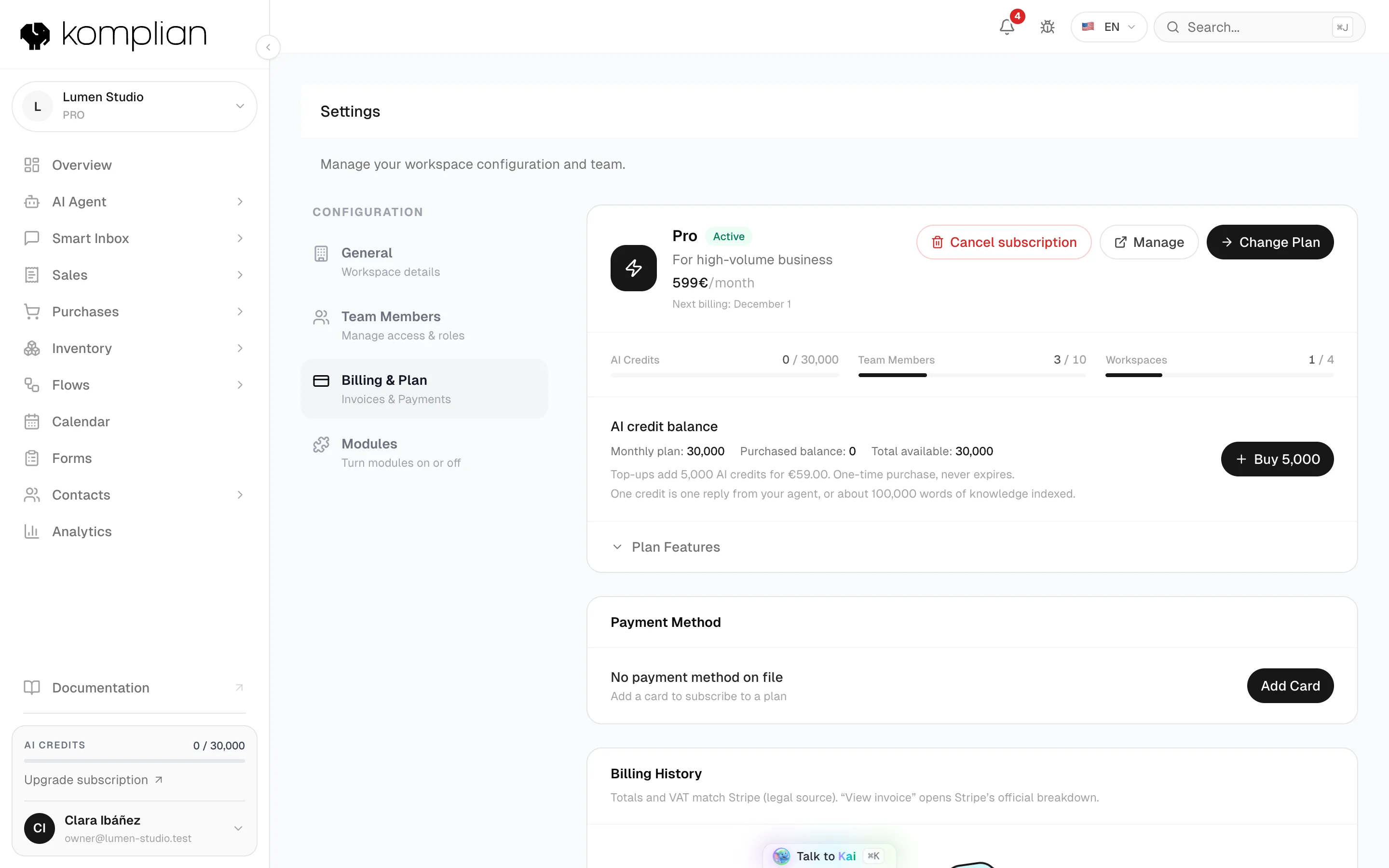
- Settings → Billing & Plan
- Plan
- All plans
- Who
- Only the owner changes the plan, the payment method or buys credits. Everyone in the workspace sees the plan and invoices.
Your plan sets the price, the modules and the limits of a workspace. Every plan brings a monthly allowance of AI credits, the one currency for everything the AI does.
Plans
Prices in euros, before tax. Paying yearly costs about 17% less.
| Starter | Growth | Pro | Enterprise | |
|---|---|---|---|---|
| Monthly price | 149 € | 299 € | 599 € | Talk to sales |
| Yearly, per month | 124 € | 249 € | 499 € | Talk to sales |
| AI credits per month | 5,000 | 15,000 | 30,000 | 50,000 |
| Workspaces | 1 | 2 | 4 | 10 |
| Team members | 2 | 5 | 10 | 25 |
| Messaging channels | 1 | 2 | 3 | 5 |
| Knowledge sources | 25 | 50 | 100 | 250 |
| Active flows | 5 | 10 | 25 | |
| Connected calendars | 2 | 2 | 4 | 10 |
| Integrations | 5 | 10 | 20 | 50 |
| Destinations per form | 3 | 10 | 25 |
Enterprise is shaped with our team for each organisation. Its figures are where a contract starts, and the contract can change them. Write to support@komplian.com.
Modules in each plan
| Starter | Growth | Pro | Enterprise | |
|---|---|---|---|---|
| AI agent and Smart Inbox | ||||
| Contacts and Calendar | ||||
| Email (your mailbox) | ||||
| Operations: Sales, Purchases, Inventory | ||||
| Integrations | ||||
| Calls (switched on per workspace) | ||||
| Flows and message templates | ||||
| Forms | ||||
| Analytics | ||||
| White label | ||||
| Zapier and Make | ||||
| Advanced knowledge (Notion, Drive, databases...) | ||||
| Proactive Komplian Intelligence |
Modules still in testing are not part of any plan. See Modules in testing.
Free trial
The free trial lasts 14 days, needs no card and runs on the plan you chose, or on Pro if you chose none. You cannot buy credit packs during it. Changing plan ends the trial at once and charges you that day. See Account and trial.
AI credits
Each plan brings its monthly credits, renewed with each billing period.
| What spends credits | Credits |
|---|---|
| A reply from the AI agent on a live channel | 1 |
| About 100,000 words of knowledge indexed | 1 |
| Translating one message in Smart Inbox | 1 |
| A request to Komplian Intelligence (Kai) | At least 1, more the more it reads and writes |
| A reply in Test Agent | Free |
Kai never uses the last 10% of your plan's monthly credits. They stay for the agent that answers your customers.
Settings → Billing & Plan → AI Credits shows:
| Line | What it counts |
|---|---|
| Monthly plan | Credits left from this period's plan allowance. |
| Purchased balance | Credits left from packs you bought. |
| Total available | Both together. |
Buy more credits
Open AI Credits
Open Settings → Billing & Plan and find AI Credits.
Buy a pack
Press the Buy button for a pack of 5,000 credits at 59 €. Stripe's checkout opens.
Pay
Pay in Stripe. Back in Komplian, the credits appear in Purchased balance once Stripe finishes processing.
You can buy packs only with an active paid subscription. A pack is a one-time purchase and never expires.
Change your plan
Open the plans
In Settings → Billing & Plan, press Change Plan.
Pick the new plan
Choose the plan, monthly or yearly, and press Switch to with its name.
Confirm
Read the summary and press Change plan.
The change applies at once. What you have not used of your current plan is deducted from your next invoice. Switching between monthly and yearly billing is charged today, minus what you have not used.
Cancel or reactivate
Cancel subscription asks you to confirm. Your workspace stays available until the end of the period you paid, and you are not charged again. Until that date, Reactivate Subscription undoes the cancellation and the plan renews normally.
Payment method and invoices
| Section | What you can do |
|---|---|
| Payment Method | See your card, Update it, or Add Card if there is none. |
| Billing History | See every Komplian invoice for your subscription. View invoice opens Stripe's breakdown, with a PDF. |
| Manage in Stripe | Open your billing in Stripe. |
These are the invoices Komplian sends you for your plan. Komplian does not issue invoices to your own customers.
Subscription status
| Status | Meaning |
|---|---|
| Trial | Free trial running. |
| Active | Paid and running. |
| Past Due | The last payment failed. Update your payment method. |
| Payment pending | A payment has not completed yet. |
| Canceled | The subscription ended. |
If a payment fails and the subscription lapses, the workspace shows Your account is suspended. Choose a plan to reactivate it and get back to your data.
More capacity
For more seats, messaging channels, workspaces or knowledge sources than your plan includes, write to support@komplian.com. The Komplian team adds them.
© 2026 Komplian AI Solutions, S.L. All rights reserved.